> For the complete documentation index, see [llms.txt](https://documentation.rcore.cz/llms.txt). Markdown versions of documentation pages are available by appending `.md` to page URLs; this page is available as [Markdown](https://documentation.rcore.cz/cfx-auth-system/error-syntax-error-near-less-than-1-greater-than.md).
# Error: syntax error near '<\1>'
How to fix this error? It's simple, just update your server.
There are two possible ways why this error occurs
* You have used FileZilla which is breaking the structure of the script so please use WinSCP which works as expected and doesn't break anything.\
\
If you did not use FileZilla but you "drag and drop it" with Remote Desktop Control that will still damage it, so please drag and drop the zip and unzip it on server do not move it with method "file by file"\\
* Your server is outdated and needs to be at least 4752 or greater.
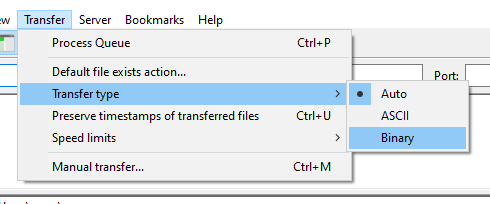
### FileZilla set binary mode
If you are using FileZilla try reupload whole resource with binary mode
Binary transfer mode
### How can I check my version?
Write into your server console `version`command
### How to update?
#### Windows
Please check this video
{% embed url="" %}
#### Linux
1. Download the last recommended artifact from this page
2. Turn off your server
3. Delete `cache` & `alpine` folder
4. Unzip `fx.tar.xz` with command `tar -xf fx.rar.xz`
5. Start the server and write `version` to see a new version
#### Windows
Exactly the same but you use windows FXServer artifact
And remove the server folder and replace it with the newly downloaded version.