# Podium Spinners

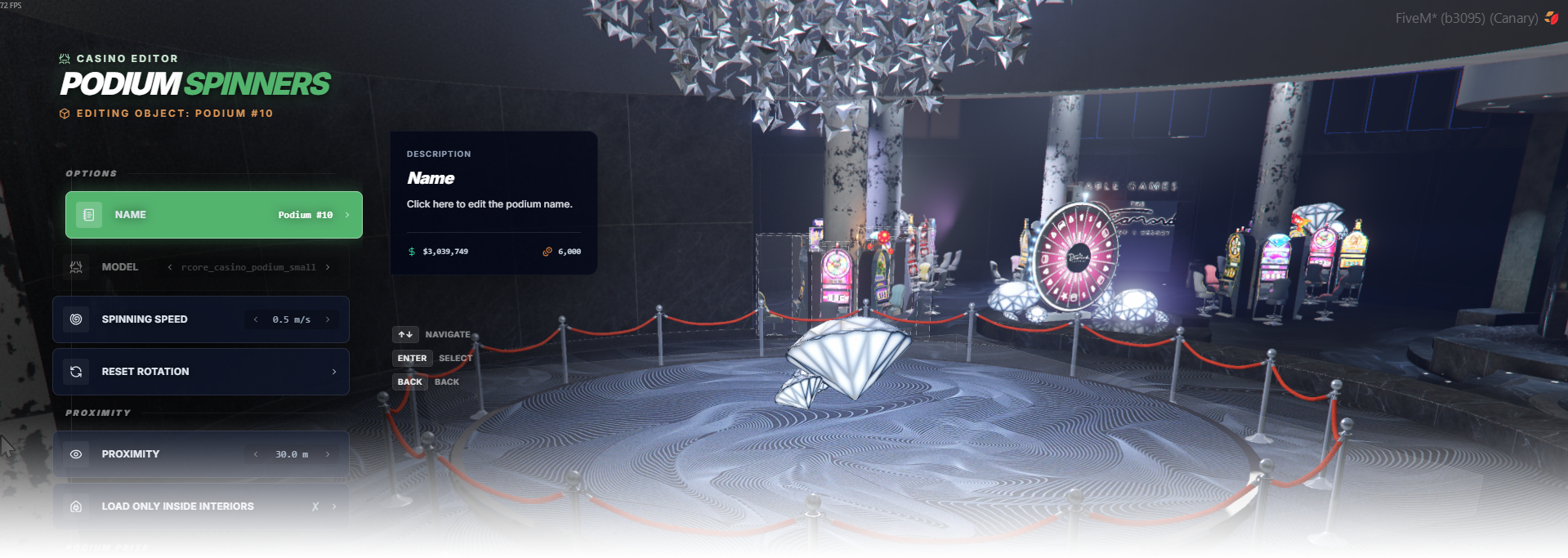
The **Podium Spinners** editor page manages podium placement, spinner model, prize display setup, and podium prize properties.

<div data-full-width="false"><figure><img src="https://1037498771-files.gitbook.io/~/files/v0/b/gitbook-x-prod.appspot.com/o/spaces%2F-MZErcztD5BvrKnwRGJq%2Fuploads%2Fgit-blob-157045f5b76c76231d20436cf328a5677dae1959%2Fcapt_podiums.png?alt=media" alt=""><figcaption></figcaption></figure></div>

### Editor Settings

<table data-full-width="false"><thead><tr><th>Setting</th><th>Type</th><th>Info</th></tr></thead><tbody><tr><td>Name</td><td>Text</td><td>Choose a display name for the podium spinner</td></tr><tr><td>Podium model</td><td>Select/List</td><td>Select the podium base model used for this spinner</td></tr><tr><td>Spinner speed</td><td>Number/List</td><td>Set podium/prize spinning speed</td></tr><tr><td>Rotation axis (X/Y/Z)</td><td>Vector3</td><td>Set the axis used for spinner rotation</td></tr><tr><td>Prize type</td><td>Select/List</td><td>Choose prize type (<code>object</code> or <code>vehicle</code>)</td></tr><tr><td>Prize model/hash</td><td>Text</td><td>Set spawned prize model name/hash</td></tr><tr><td>Prize display name</td><td>Text</td><td>Set label/name shown for the podium prize</td></tr><tr><td>Prize offset</td><td>Vector3</td><td>Set position offset of the prize relative to podium</td></tr><tr><td>Prize rotation</td><td>Vector3</td><td>Set initial rotation offset for the prize</td></tr><tr><td>Reset prize position</td><td>Action</td><td>Reset prize offset back to default values</td></tr><tr><td>Reset prize rotation</td><td>Action</td><td>Reset prize rotation offset back to default values</td></tr><tr><td>Move/rotate prize with gizmo</td><td>Action</td><td>Use gizmo selection on podium prize object for fine alignment</td></tr><tr><td>Society enabled</td><td>Toggle</td><td>Enable society/account integration for podium rewards/costs</td></tr><tr><td>Society name</td><td>Text/List</td><td>Set society/account name used when society is enabled</td></tr><tr><td>Proximity</td><td>Number</td><td>Set interaction distance in meters</td></tr><tr><td>Load only interiors</td><td>Toggle</td><td>Load this podium only while players are in interiors</td></tr><tr><td>Create podium spinner</td><td>Action</td><td>Create a new podium spinner at player position</td></tr><tr><td>Delete podium spinner</td><td>Action</td><td>Delete selected podium spinner</td></tr></tbody></table>

## Prize Types

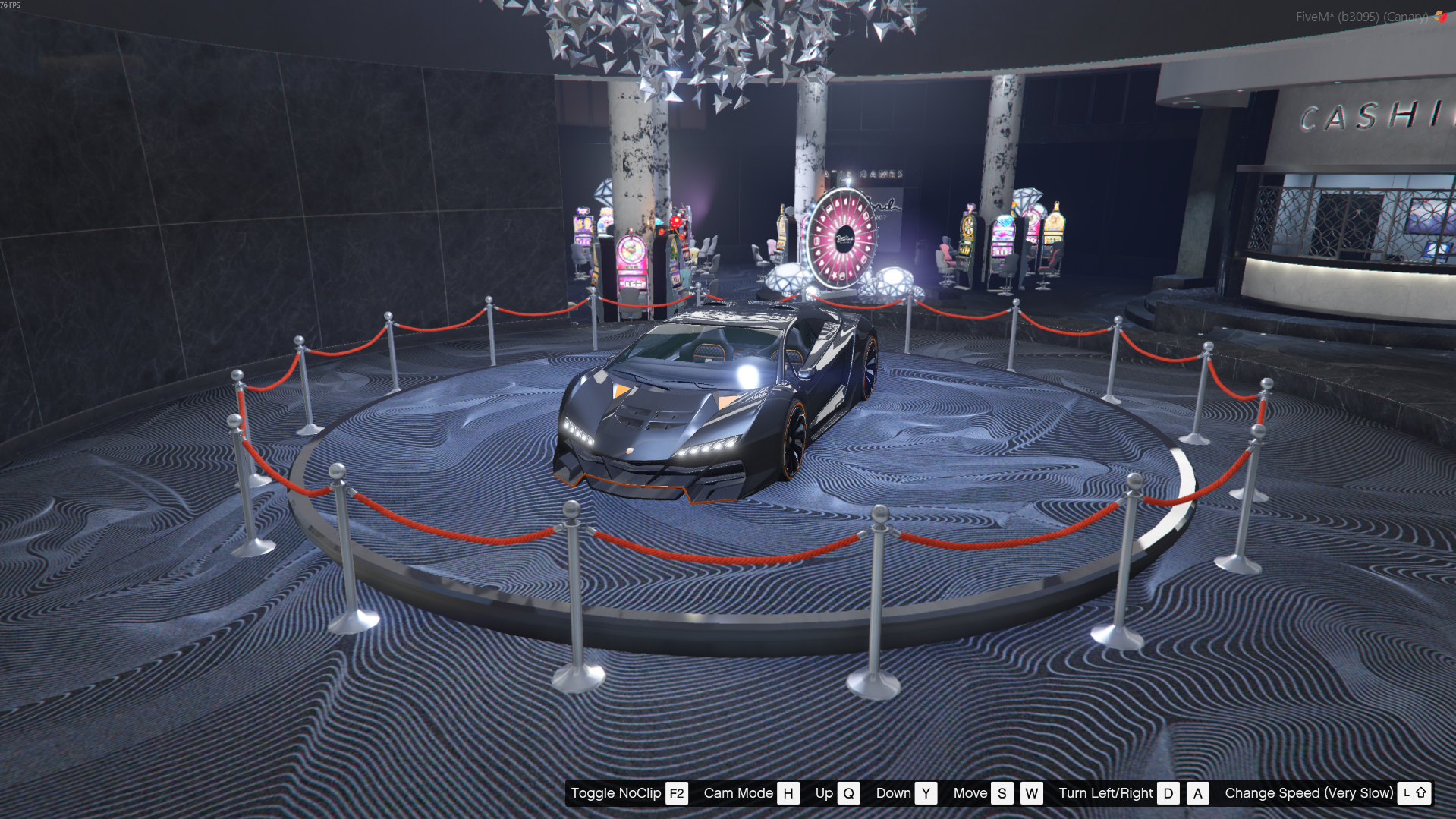
You can either put a prop in your podium spinner of your choice, or a vehicle.

<table data-full-width="false"><thead><tr><th width="127">Model Preview</th><th>Type</th></tr></thead><tbody><tr><td><img src="https://1037498771-files.gitbook.io/~/files/v0/b/gitbook-x-prod.appspot.com/o/spaces%2F-MZErcztD5BvrKnwRGJq%2Fuploads%2Fgit-blob-2f3c24ee795a8ede34e5891167a05c25b1094f7d%2Fpodium_car.png?alt=media" alt=""></td><td><code>Vehicle</code></td></tr><tr><td><img src="https://1037498771-files.gitbook.io/~/files/v0/b/gitbook-x-prod.appspot.com/o/spaces%2F-MZErcztD5BvrKnwRGJq%2Fuploads%2Fgit-blob-daf537dd7068d45f48a7a674f595969a9382d619%2Frcore_casino_podium_large.png?alt=media" alt=""></td><td><code>Object</code></td></tr></tbody></table>

### Vehicle Prize

The Vehicle prize allows you to display a vehicle with custom modifications on the podium. After selecting a vehicle, you can adjust its modifications by choosing “Edit Vehicle Mods” in the editor.

Make sure that the podium prize type is set to "Vehicle", otherwise the vehicle will not display correctly.

You can also connect the podium to a delivery system that allows players to bring new vehicles to it by entering a special checkpoint. For setup instructions, please refer to the page: [Vehicle Delivery](https://documentation.rcore.cz/paid-resources/rcore_casino/rcore_casino-2/editor/podium-spinners/vehicle-delivery)

### Object Prize

The Object prize acts as a simple placeholder for the podium. You can place any prop of your choice as the displayed item.

## Adjusting prize offset

If the prize position needs adjustment (for example the Z coordinate), you can modify it by selecting “Change Offset” in the editor menu.

This will enable the gizmo controls, allowing you to position the prize so it sits correctly on the ground.

{% embed url="<https://files.gitbook.com/v0/b/gitbook-x-prod.appspot.com/o/spaces%2FFicarM3Z9iXA9Tfz78vZ%2Fuploads%2Fy8d9cbwCp97b85aas2Kf%2Fpodium_adjustoffset_2.mp4?alt=media&token=fd33671c-cdf4-470f-b02e-f0c576fce06e>" %}

## PodiumSpinnerModels

Selectable podium base models are defined in `rcore_casino/configs/podiumspinner.lua` in `PodiumSpinnerModels`.

Only models in this list can be selected when creating/editing podium spinners in editor.

<table data-full-width="false"><thead><tr><th width="127">Model Preview</th><th>Model Name</th></tr></thead><tbody><tr><td><img src="https://1037498771-files.gitbook.io/~/files/v0/b/gitbook-x-prod.appspot.com/o/spaces%2F-MZErcztD5BvrKnwRGJq%2Fuploads%2Fgit-blob-055ee0bde3a34761afac7ed81bb0791c050435c9%2Frcore_casino_podium_small.png?alt=media" alt=""></td><td><code>rcore_casino_podium_small</code></td></tr><tr><td><img src="https://1037498771-files.gitbook.io/~/files/v0/b/gitbook-x-prod.appspot.com/o/spaces%2F-MZErcztD5BvrKnwRGJq%2Fuploads%2Fgit-blob-0ff6fb2c0bbc1d1a65b67c4d238bb2b5f3105899%2Frcore_casino_podium_medium.png?alt=media" alt=""></td><td><code>rcore_casino_podium_medium</code></td></tr><tr><td><img src="https://1037498771-files.gitbook.io/~/files/v0/b/gitbook-x-prod.appspot.com/o/spaces%2F-MZErcztD5BvrKnwRGJq%2Fuploads%2Fgit-blob-daf537dd7068d45f48a7a674f595969a9382d619%2Frcore_casino_podium_large.png?alt=media" alt=""></td><td><code>rcore_casino_podium_large</code></td></tr><tr><td><img src="https://1037498771-files.gitbook.io/~/files/v0/b/gitbook-x-prod.appspot.com/o/spaces%2F-MZErcztD5BvrKnwRGJq%2Fuploads%2Fgit-blob-daf537dd7068d45f48a7a674f595969a9382d619%2Frcore_casino_podium_large.png?alt=media" alt=""></td><td><code>vw_prop_vw_casino_podium_01a</code></td></tr></tbody></table>


---

# Agent Instructions: Querying This Documentation

If you need additional information that is not directly available in this page, you can query the documentation dynamically by asking a question.

Perform an HTTP GET request on the current page URL with the `ask` query parameter:

```
GET https://documentation.rcore.cz/paid-resources/rcore_casino/rcore_casino-2/editor/podium-spinners.md?ask=<question>
```

The question should be specific, self-contained, and written in natural language.
The response will contain a direct answer to the question and relevant excerpts and sources from the documentation.

Use this mechanism when the answer is not explicitly present in the current page, you need clarification or additional context, or you want to retrieve related documentation sections.