# Lucky Wheel

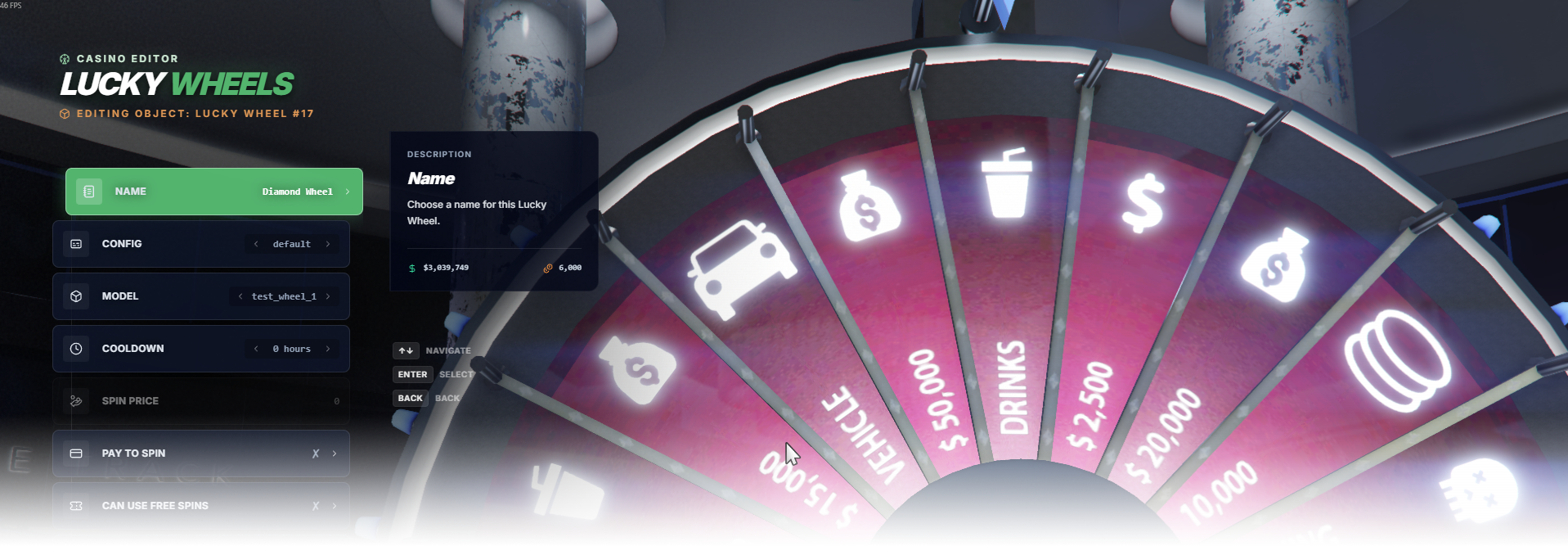
The **Lucky Wheel** editor page manages wheel placement, model, cooldown, price settings, and access rules.

<div data-full-width="false"><figure><img src="https://1037498771-files.gitbook.io/~/files/v0/b/gitbook-x-prod.appspot.com/o/spaces%2F-MZErcztD5BvrKnwRGJq%2Fuploads%2Fgit-blob-68b3d080b7e7e5aedca7d4247cfb4afec5516bda%2Fcapt_wheel.png?alt=media" alt=""><figcaption></figcaption></figure></div>

### Editor Settings

<table data-full-width="false"><thead><tr><th>Setting</th><th>Type</th><th>Info</th></tr></thead><tbody><tr><td>Name</td><td>Text</td><td>Choose a display name for the Lucky Wheel</td></tr><tr><td>Wheel model</td><td>Select/List</td><td>Select the wheel/circle model used by this wheel</td></tr><tr><td>Cooldown</td><td>Select/List</td><td>Set spin cooldown (configured as hour-based options)</td></tr><tr><td>Enabled</td><td>Toggle</td><td>Enable or disable this wheel</td></tr><tr><td>Pay to spin</td><td>Toggle</td><td>Require payment for spin attempts</td></tr><tr><td>VIP only</td><td>Toggle</td><td>Restrict wheel usage to VIP players only</td></tr><tr><td>Spin price</td><td>Number (text input)</td><td>Set spin cost when pay-to-spin is enabled</td></tr><tr><td>Society enabled</td><td>Toggle</td><td>Enable society/account integration for wheel revenue</td></tr><tr><td>Society name</td><td>Text/List</td><td>Set society/account name used when society is enabled</td></tr><tr><td>Proximity</td><td>Number</td><td>Set interaction distance in meters</td></tr><tr><td>Load only interiors</td><td>Toggle</td><td>Load this wheel only while players are in interiors</td></tr><tr><td>Add Lucky Wheel</td><td>Action</td><td>Create a new wheel at current player spawn coords/heading</td></tr><tr><td>Delete Lucky Wheel</td><td>Action</td><td>Delete selected wheel</td></tr></tbody></table>

### WheelConfigs

Wheel rewards and behavior are defined in `rcore_casino/configs/luckywheel.lua` inside the `WheelConfigs` table.

Each config (for example `default`) is a list of wheel slices (1..20), where every slice can define reward logic, weight, sounds, and animation.

<table data-full-width="false"><thead><tr><th>Config field</th><th>Type</th><th>Info</th></tr></thead><tbody><tr><td><code>caption</code></td><td>Text</td><td>Label displayed for the wheel slot/reward</td></tr><tr><td><code>event</code></td><td>Event array</td><td>Server event reward definition (usually with <code>pid</code> placeholder for player id)</td></tr><tr><td><code>action</code></td><td>Function</td><td>Custom Lua reward handler for advanced rewards</td></tr><tr><td><code>possibility</code></td><td>Number (weight)</td><td>Relative chance weight for this reward slot</td></tr><tr><td><code>wheelSound</code></td><td>Text</td><td>Sound set used on win (<code>Win_Cash</code>, <code>Win_RP</code>, <code>Win_Chips</code>, etc.)</td></tr><tr><td><code>pedAnimation</code></td><td>Text</td><td>Ped reaction animation key (<code>win</code>, <code>win_big</code>, <code>win_huge</code>, ...)</td></tr><tr><td><code>societyDeduct</code></td><td>Number</td><td>Amount deducted from society if that reward needs funding</td></tr><tr><td><code>incrementProfitStats</code></td><td>Number</td><td>Profit stats value increment for analytics/logging</td></tr><tr><td><code>isNoWinItem</code></td><td>Toggle</td><td>Marks this slot as no-win outcome</td></tr></tbody></table>

### LuckyWheelCircles

Available wheel models for the editor are defined in `rcore_casino/configs/luckywheel.lua` in the `LuckyWheelCircles` list.

If you want a custom wheel model to be selectable in the editor, add it to this list.

<table data-full-width="false"><thead><tr><th>Field</th><th>Type</th><th>Info</th></tr></thead><tbody><tr><td><code>LuckyWheelCircles</code></td><td>List of model names</td><td>Defines selectable Lucky Wheel circle models in editor</td></tr><tr><td><code>Wheels[*].model</code></td><td>Text</td><td>Model value chosen from <code>LuckyWheelCircles</code> for each wheel instance</td></tr></tbody></table>

### Creating Wheel Circles

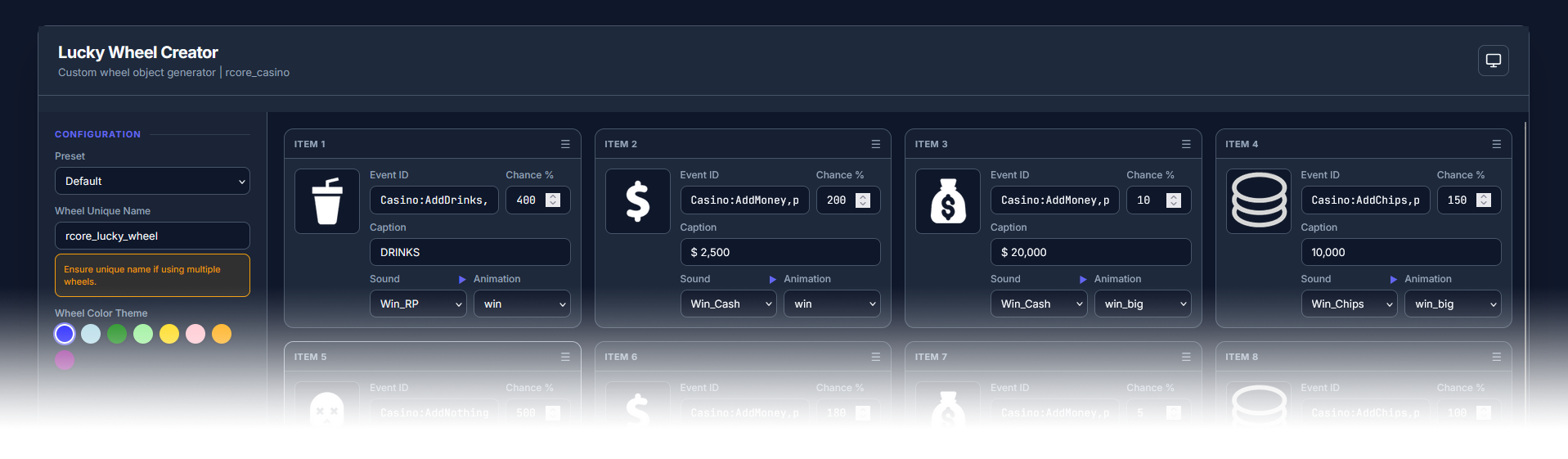
You can create custom wheel circle models with our generator tool:

<https://casino.rcore.cz/v2/>

<div data-full-width="false"><figure><img src="https://1037498771-files.gitbook.io/~/files/v0/b/gitbook-x-prod.appspot.com/o/spaces%2F-MZErcztD5BvrKnwRGJq%2Fuploads%2Fgit-blob-ca06063e97350783f27504442cf484abc1863218%2Fcapt_wheelcreator.png?alt=media" alt=""><figcaption></figcaption></figure></div>

The tool lets you:

* customize wheel icons,
* customize wheel texts,
* customize wheel color,
* generate the wheel circle `.yft` model file.

After generation, you can download everything as a `.zip` package. The package also includes a tutorial file explaining how to install the generated wheel circle on your server.

After installation, add your new model name to `LuckyWheelCircles` in `rcore_casino/configs/luckywheel.lua` so it becomes selectable in the editor.


---

# Agent Instructions: Querying This Documentation

If you need additional information that is not directly available in this page, you can query the documentation dynamically by asking a question.

Perform an HTTP GET request on the current page URL with the `ask` query parameter:

```
GET https://documentation.rcore.cz/paid-resources/rcore_casino/rcore_casino-2/editor/lucky-wheel.md?ask=<question>
```

The question should be specific, self-contained, and written in natural language.
The response will contain a direct answer to the question and relevant excerpts and sources from the documentation.

Use this mechanism when the answer is not explicitly present in the current page, you need clarification or additional context, or you want to retrieve related documentation sections.