# Inside Track

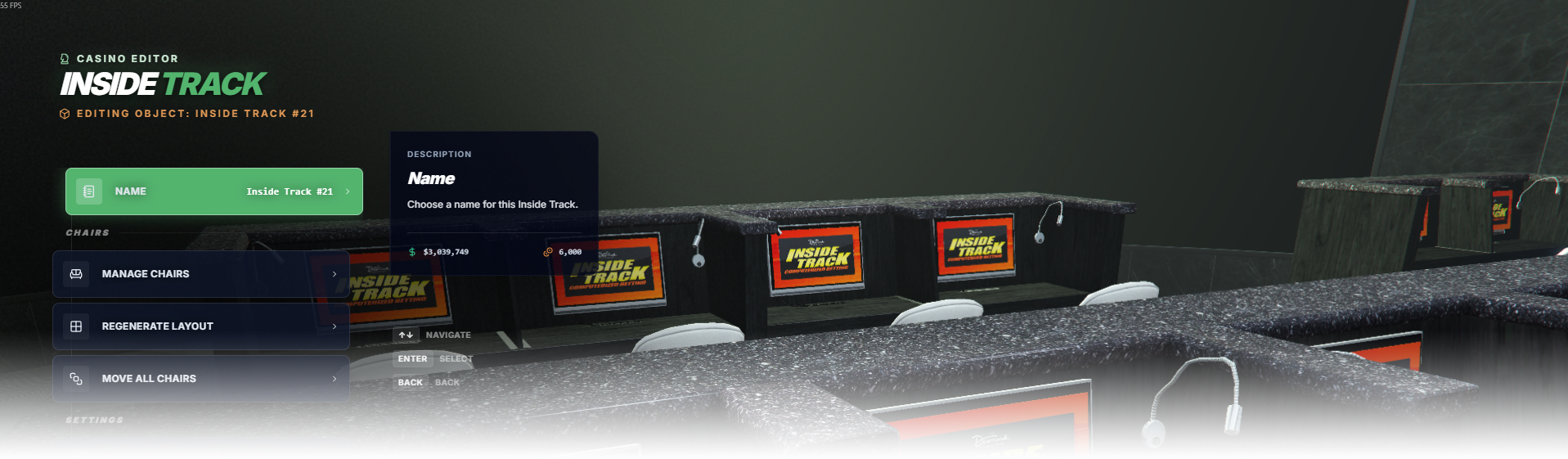
The **Inside Track** editor page manages horse betting terminals, layout, limits, and big-screen setup.

<div data-full-width="false"><figure><img src="https://1037498771-files.gitbook.io/~/files/v0/b/gitbook-x-prod.appspot.com/o/spaces%2F-MZErcztD5BvrKnwRGJq%2Fuploads%2Fgit-blob-4a569ca8109d2e91aa6be8aaca25cf7a28ba98b1%2Fcapt_it.png?alt=media" alt=""><figcaption></figcaption></figure></div>

### Editor Settings

<table data-full-width="false"><thead><tr><th>Setting</th><th>Type</th><th>Info</th></tr></thead><tbody><tr><td>Name</td><td>Text</td><td>Choose a display name for this Inside Track group</td></tr><tr><td>Layout columns</td><td>Number/List</td><td>Set how many terminal columns are generated</td></tr><tr><td>Layout rows</td><td>Number/List</td><td>Set how many terminal rows are generated</td></tr><tr><td>Layout type</td><td>Select/List</td><td>Choose the layout variant used for terminal placement</td></tr><tr><td>Padding X</td><td>Number/List</td><td>Horizontal spacing between terminal positions</td></tr><tr><td>Padding Y</td><td>Number/List</td><td>Vertical spacing between terminal positions</td></tr><tr><td>Main race duration</td><td>Number/List</td><td>Set duration of the main race cycle</td></tr><tr><td>Main race max players</td><td>Number/List</td><td>Set maximum players allowed in main race</td></tr><tr><td>Main race wait time</td><td>Number/List</td><td>Set waiting time before race starts</td></tr><tr><td>Main race next wait time</td><td>Number/List</td><td>Set cooldown/wait before the next race</td></tr><tr><td>Main race min bet</td><td>Number/List</td><td>Set minimum bet amount</td></tr><tr><td>Main race max bet</td><td>Number/List</td><td>Set maximum bet amount</td></tr><tr><td>Main race tax</td><td>Number/List</td><td>Set tax/fee percentage for main race betting</td></tr><tr><td>Local race duration</td><td>Number/List</td><td>Set duration of local race rounds</td></tr><tr><td>Local race min bet</td><td>Number/List</td><td>Set minimum local race bet amount</td></tr><tr><td>Local race max bet</td><td>Number/List</td><td>Set maximum local race bet amount</td></tr><tr><td>Local race tax</td><td>Number/List</td><td>Set tax/fee percentage for local race betting</td></tr><tr><td>Main race cooldown</td><td>Number/List</td><td>Set cooldown between main race starts</td></tr><tr><td>Local race cooldown</td><td>Number/List</td><td>Set cooldown between local race starts</td></tr><tr><td>Horse odds tuning</td><td>Range/List</td><td>Configure favorite odds ranges and matching behavior</td></tr><tr><td>Big screen model</td><td>Text</td><td>Model name used for the Inside Track big screen</td></tr><tr><td>Big screen texture name</td><td>Text</td><td>Render target texture name used by the big screen</td></tr><tr><td>Big screen square X/Y/Width/Height</td><td>Number/List</td><td>Render-target fit rectangle values for video output</td></tr><tr><td>Big screen create object</td><td>Toggle</td><td>Create/remove the big screen object for this group</td></tr><tr><td>Big screen fit render target</td><td>Toggle</td><td>Auto-fit render texture on the configured big screen area</td></tr><tr><td>Society enabled</td><td>Toggle</td><td>Enable society/account integration for this group</td></tr><tr><td>Society name</td><td>Text/List</td><td>Set society/account name for Inside Track revenue sharing</td></tr><tr><td>Proximity</td><td>Number</td><td>Set interaction distance in meters</td></tr><tr><td>Load only interiors</td><td>Toggle</td><td>Load this Inside Track group only while players are in interiors</td></tr></tbody></table>

### Chair Settings

<table data-full-width="false"><thead><tr><th>Setting</th><th>Type</th><th>Info</th></tr></thead><tbody><tr><td>Enabled (enterable)</td><td>Toggle</td><td>Allow/disallow players to use the chair</td></tr><tr><td>Has screen</td><td>Toggle</td><td>Enable/disable monitor display for that chair</td></tr><tr><td>Chair model</td><td>Select/List</td><td>Select chair model from configured chair model list</td></tr><tr><td>Add chair</td><td>Action</td><td>Create a new chair at player position/heading</td></tr><tr><td>Copy chairs from world objects</td><td>Action</td><td>Generate chairs from detected world objects</td></tr><tr><td>Delete chair</td><td>Action</td><td>Delete selected chair from this Inside Track group</td></tr></tbody></table>

## HorseGamingChairModels

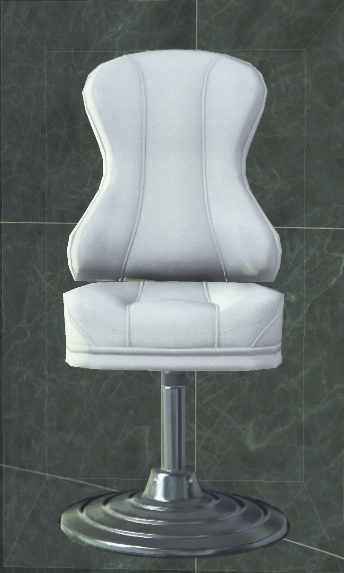
Inside Track chair models are defined in `rcore_casino/configs/insidetrack.lua` in the `HorseGamingChairModels` list.

Only models in `HorseGamingChairModels` can be mapped/treated as horse gaming chairs, and only those models can be selected when creating new Inside Track chairs in the editor.

<table data-full-width="false"><thead><tr><th width="127">Model Preview</th><th>Model Name</th></tr></thead><tbody><tr><td><img src="https://1037498771-files.gitbook.io/~/files/v0/b/gitbook-x-prod.appspot.com/o/spaces%2F-MZErcztD5BvrKnwRGJq%2Fuploads%2Fgit-blob-41adc1375ef555f6beb01a761a45f51d027521dc%2Fvw_prop_casino_track_chair_01.png?alt=media" alt=""></td><td>vw_prop_casino_track_chair_01</td></tr></tbody></table>

## Useful Info

<table data-full-width="false"><thead><tr><th>Item</th><th>Value</th><th>Info</th></tr></thead><tbody><tr><td>Default Diamond Casino big screen model</td><td><code>vw_vwint01_betting_screen</code></td><td>Default model used for the Inside Track big screen in the Diamond Casino setup.</td></tr><tr><td>Render target texture name</td><td><code>casinoscreen_02</code></td><td>Use this render target texture name with the default Diamond Casino big screen model.</td></tr></tbody></table>

## Little Screen (Chair Monitor)

Little chair screens are not edited directly in the Inside Track editor. Their position/rotation is auto-generated from each chair position + heading (using display offsets), and they follow chair updates.

Only the built-in little screen models are used in the resource.

<table data-full-width="false"><thead><tr><th width="127">Model Preview</th><th>Model Name</th><th>Usage Info</th></tr></thead><tbody><tr><td><img src="https://1037498771-files.gitbook.io/~/files/v0/b/gitbook-x-prod.appspot.com/o/spaces%2F-MZErcztD5BvrKnwRGJq%2Fuploads%2Fgit-blob-ff4338a529c624ff02de848211ee433360b658db%2Frcore_it_little_screen.png?alt=media" alt=""></td><td><code>rcore_it_little_screen</code></td><td>Default little screen model used for Inside Track chair displays.</td></tr></tbody></table>


---

# Agent Instructions: Querying This Documentation

If you need additional information that is not directly available in this page, you can query the documentation dynamically by asking a question.

Perform an HTTP GET request on the current page URL with the `ask` query parameter:

```
GET https://documentation.rcore.cz/paid-resources/rcore_casino/rcore_casino-2/editor/inside-track.md?ask=<question>
```

The question should be specific, self-contained, and written in natural language.
The response will contain a direct answer to the question and relevant excerpts and sources from the documentation.

Use this mechanism when the answer is not explicitly present in the current page, you need clarification or additional context, or you want to retrieve related documentation sections.