# Checkpoints

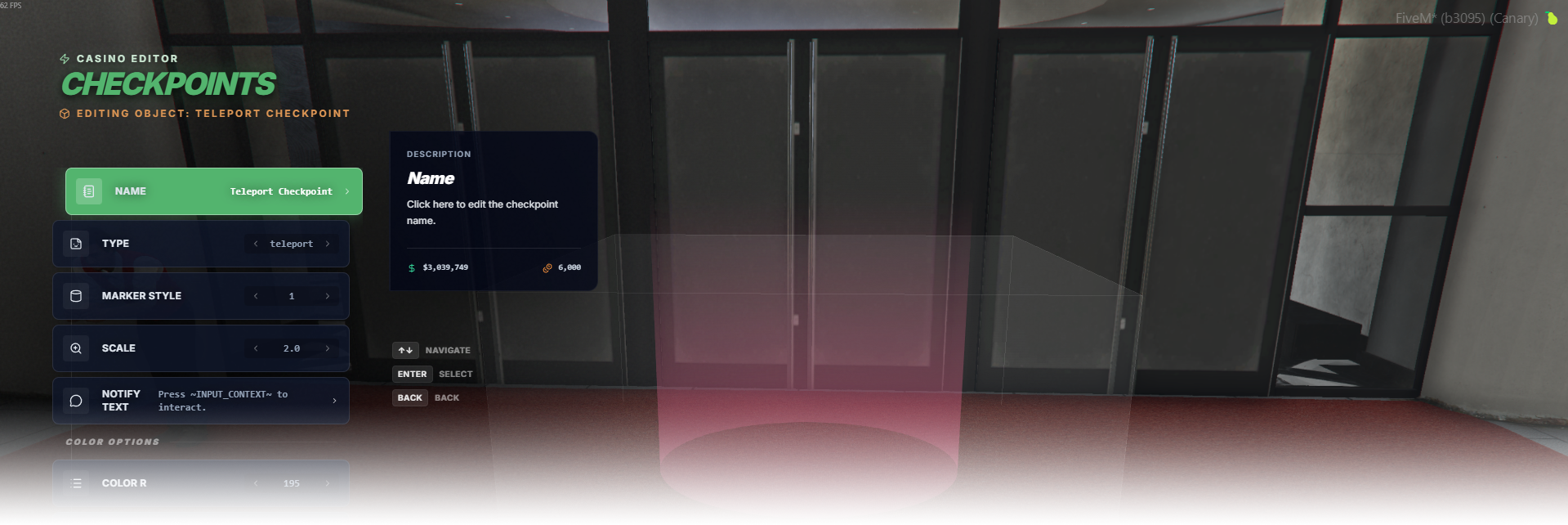
The **Checkpoints** editor page manages interactive marker checkpoints for event triggering, teleporting, and casino vehicle podium interactions.

<div data-full-width="false"><figure><img src="https://1037498771-files.gitbook.io/~/files/v0/b/gitbook-x-prod.appspot.com/o/spaces%2F-MZErcztD5BvrKnwRGJq%2Fuploads%2Fgit-blob-03a661901a43a96c74bc32d805f2cd23f1a4a4c7%2Fcapt_checkpoints.png?alt=media" alt=""><figcaption></figcaption></figure></div>

### Editor Settings

<table data-full-width="false"><thead><tr><th>Setting</th><th>Type</th><th>Info</th></tr></thead><tbody><tr><td>Name</td><td>Text</td><td>Choose a display name for the checkpoint</td></tr><tr><td>Checkpoint type</td><td>Select/List</td><td>Choose behavior: <code>event</code>, <code>teleport</code>, or <code>casinovehicle</code></td></tr><tr><td>Marker style</td><td>Select/List</td><td>Set GTA marker type id (0..43)</td></tr><tr><td>Marker scale</td><td>Select/List</td><td>Set marker size scale</td></tr><tr><td>Notify text</td><td>Text</td><td>Set interaction/prompt text shown for this checkpoint</td></tr><tr><td>Marker color</td><td>Color preset + RGBA</td><td>Set marker color using presets or custom channels</td></tr><tr><td>Event name</td><td>Text</td><td>Set triggered event name when type is <code>event</code></td></tr><tr><td>Teleport coords (X/Y/Z)</td><td>Vector3</td><td>Teleport destination when type is <code>teleport</code></td></tr><tr><td>Use current coords</td><td>Action</td><td>Copy current player position into teleport coordinates</td></tr><tr><td>Fade while teleport</td><td>Toggle</td><td>Enable/disable screen fade during teleport flow</td></tr><tr><td>Podium id</td><td>Select/List</td><td>Select podium spinner id when type is <code>casinovehicle</code></td></tr><tr><td>Restrictions</td><td>Action</td><td>Open restrictions editor for access rules</td></tr><tr><td>Proximity</td><td>Number</td><td>Set interaction/subscription distance in meters</td></tr><tr><td>Load only interiors</td><td>Toggle</td><td>Load this checkpoint only while players are in interiors</td></tr><tr><td>Add checkpoint</td><td>Action</td><td>Create a new checkpoint near current player position</td></tr><tr><td>Delete checkpoint</td><td>Action</td><td>Delete selected checkpoint</td></tr></tbody></table>

## CheckpointTypes

<table data-full-width="false"><thead><tr><th>Type</th><th>Behavior</th><th>Main fields used</th></tr></thead><tbody><tr><td><code>event</code></td><td>Runs configured event when player interacts with the checkpoint.</td><td><code>eventName</code>, <code>notifyText</code>, <code>restrictions</code></td></tr><tr><td><code>teleport</code></td><td>Teleports player to configured destination when interacted.</td><td><code>teleportCoords</code>, <code>fadeWhileTeleport</code>, <code>notifyText</code>, <code>restrictions</code></td></tr><tr><td><code>casinovehicle</code></td><td>Uses linked podium spinner/vehicle context for casino vehicle interaction flow.</td><td><code>podiumId</code>, <code>notifyText</code>, <code>restrictions</code></td></tr></tbody></table>


---

# Agent Instructions: Querying This Documentation

If you need additional information that is not directly available in this page, you can query the documentation dynamically by asking a question.

Perform an HTTP GET request on the current page URL with the `ask` query parameter:

```
GET https://documentation.rcore.cz/paid-resources/rcore_casino/rcore_casino-2/editor/checkpoints.md?ask=<question>
```

The question should be specific, self-contained, and written in natural language.
The response will contain a direct answer to the question and relevant excerpts and sources from the documentation.

Use this mechanism when the answer is not explicitly present in the current page, you need clarification or additional context, or you want to retrieve related documentation sections.