# Casinos

The **Casinos editor page** allows you to link an interior ID to a casino. Once linked, you can manage the casino’s opening hours, customize the minimap and chips HUD displayed while inside the casino, and configure other related settings.

<div data-full-width="false"><figure><img src="https://1037498771-files.gitbook.io/~/files/v0/b/gitbook-x-prod.appspot.com/o/spaces%2F-MZErcztD5BvrKnwRGJq%2Fuploads%2Fgit-blob-b756ab84029497ad6535f383c60ed7566941ee1f%2Fcapt_casinos.png?alt=media" alt=""><figcaption></figcaption></figure></div>

### Editor Settings

<table data-full-width="false"><thead><tr><th>Setting</th><th>Type</th><th>Info</th></tr></thead><tbody><tr><td>Name</td><td>Text</td><td>Choose casino display name</td></tr><tr><td>Interior ids</td><td>Text/List</td><td>Set comma-separated interior ids recognized as this casino</td></tr><tr><td>Append current interior id</td><td>Action</td><td>Detect and append current player interior id</td></tr><tr><td>Open hours (Sun-Sat)</td><td>Text/List</td><td>Set allowed open hours per day (<code>-1</code> for open all day)</td></tr><tr><td>Closed message</td><td>Text</td><td>Set message shown when casino is closed (<code>%s</code> for next opening time)</td></tr><tr><td>Restrict controls</td><td>Toggle</td><td>Enable/disable casino-specific control restrictions</td></tr><tr><td>Show radar</td><td>Toggle</td><td>Enable interior radar/minimap overlay for this casino</td></tr><tr><td>Radar zoom level</td><td>Select/List</td><td>Set interior radar zoom value (or keep default behavior)</td></tr><tr><td>Radar interior id</td><td>Number/Text</td><td>Set interior id used by radar mapping</td></tr><tr><td>Radar X/Y/Heading</td><td>Number/List</td><td>Set radar transform values for minimap alignment</td></tr><tr><td>Kick-out coords (X/Y/Z)</td><td>Vector3</td><td>Set position where players are moved when casino closes</td></tr><tr><td>Use current position</td><td>Action</td><td>Copy current player position into kick-out coords</td></tr><tr><td>Show chips HUD</td><td>Toggle</td><td>Enable/disable chips HUD while in this casino</td></tr><tr><td>Add casino</td><td>Action</td><td>Create a new casino profile using current interior id</td></tr><tr><td>Delete casino</td><td>Action</td><td>Delete selected casino profile</td></tr></tbody></table>

## Opening hours (how to set them)

Opening hours are stored in `openHours` as a day-indexed table where:

* `[1]` = Sunday
* `[2]` = Monday
* `[3]` = Tuesday
* `[4]` = Wednesday
* `[5]` = Thursday
* `[6]` = Friday
* `[7]` = Saturday

Each day is a list of allowed hour values in 24h format (`0..23`).

* Use `{-1}` to keep that day open all day.
* Use a list like `{18, 19, 20, 21, 22, 23}` to open only in evening/night hours.

Example:

```lua
openHours = {
  [1] = {-1},                          -- Sunday: open all day
  [2] = {10, 11, 12, 13, 14, 15, 16}, -- Monday: 10:00-16:59
  [3] = {10, 11, 12, 13, 14, 15, 16},
  [4] = {10, 11, 12, 13, 14, 15, 16},
  [5] = {18, 19, 20, 21, 22, 23},     -- Thursday: evening
  [6] = {18, 19, 20, 21, 22, 23},     -- Friday: evening
  [7] = {-1}                           -- Saturday: open all day
}
```

## Radar interior id (how to set it)

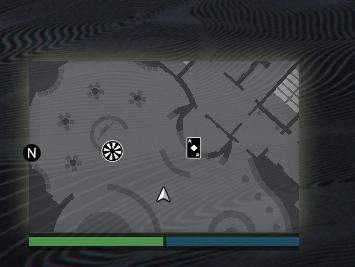
`Radar interior id` is used when `Show radar` is enabled, and it defines which interior radar context should be used for minimap rendering.

How to set it in editor:

1. Open the casino profile.
2. Enable **Show radar**.
3. Set **Radar interior id** (usually the interior id/string expected by your radar setup).
4. Adjust **Radar X**, **Radar Y**, and **Radar Heading** until minimap alignment matches your interior.

<div data-full-width="false"><figure><img src="https://1037498771-files.gitbook.io/~/files/v0/b/gitbook-x-prod.appspot.com/o/spaces%2F-MZErcztD5BvrKnwRGJq%2Fuploads%2Fgit-blob-f18279eea6a6d55fe7d4254a5c9ec781ee7f59cf%2Fcasino_radar.png?alt=media" alt="Radar interior id example in casino editor"><figcaption><p>Radar interior id setup example</p></figcaption></figure></div>

### Useful Info (Diamond Casino)

<table data-header-hidden data-full-width="false"><thead><tr><th>-</th><th>-</th></tr></thead><tbody><tr><td>Radar Interior ID</td><td><code>ch_dlc_casino_back</code></td></tr><tr><td>Coords</td><td><code>974.89, 22.80, -31.0</code></td></tr></tbody></table>


---

# Agent Instructions: Querying This Documentation

If you need additional information that is not directly available in this page, you can query the documentation dynamically by asking a question.

Perform an HTTP GET request on the current page URL with the `ask` query parameter:

```
GET https://documentation.rcore.cz/paid-resources/rcore_casino/rcore_casino-2/editor/casinos.md?ask=<question>
```

The question should be specific, self-contained, and written in natural language.
The response will contain a direct answer to the question and relevant excerpts and sources from the documentation.

Use this mechanism when the answer is not explicitly present in the current page, you need clarification or additional context, or you want to retrieve related documentation sections.