> For the complete documentation index, see [llms.txt](https://documentation.rcore.cz/llms.txt). Markdown versions of documentation pages are available by appending `.md` to page URLs; this page is available as [Markdown](https://documentation.rcore.cz/paid-resources/rcore_casino/features/editor/lucky-wheel.md).

# Lucky Wheel

Managing Lucky Wheel in the Casino Editor

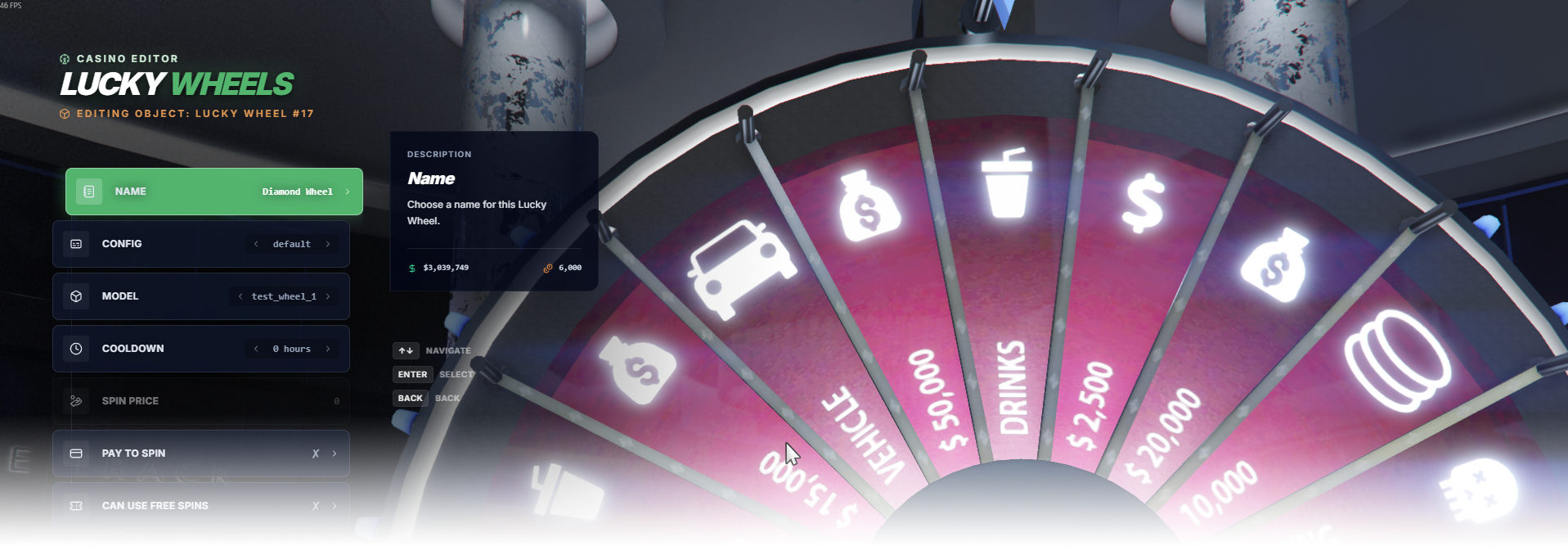
The Lucky Wheel editor page manages wheel placement, model, cooldown, price settings, and access rules.

<div data-full-width="false"><figure><img src="https://1037498771-files.gitbook.io/~/files/v0/b/gitbook-x-prod.appspot.com/o/spaces%2F-MZErcztD5BvrKnwRGJq%2Fuploads%2Fgit-blob-68b3d080b7e7e5aedca7d4247cfb4afec5516bda%2Fcapt_wheel.png?alt=media" alt=""><figcaption></figcaption></figure></div>

### Editor Settings

<table data-full-width="false"><thead><tr><th>Setting</th><th>Info</th></tr></thead><tbody><tr><td>Name</td><td>Choose a display name for the Lucky Wheel</td></tr><tr><td>Config</td><td>Which reward pool from <code>WheelConfigs</code> this wheel spins. More in <a href="https://documentation.rcore.cz/paid-resources/rcore_casino/config-reference/tweaking-games/lucky-wheel.md#reward-pools">Reward pools</a></td></tr><tr><td>Model</td><td>Select the wheel/circle model used by this wheel</td></tr><tr><td>Cooldown</td><td>Set spin cooldown (configured as hour-based options)</td></tr><tr><td>Pay To Spin</td><td>Require payment for spin attempts</td></tr><tr><td>Can Use Free Spins</td><td>Allow players to spend a <code>wheeltickets</code> bonus for a free spin (<code>canUseFreeSpins</code>)</td></tr><tr><td>VIP Only</td><td>Restrict wheel usage to VIP players only</td></tr><tr><td>Create Base</td><td>Spawn the wheel's base prop. Turn off when the map already contains one (<code>createBase</code>)</td></tr><tr><td>Spin Price</td><td>Set spin cost when pay-to-spin is enabled</td></tr><tr><td>Enable Society</td><td>Enable society/account integration for wheel revenue</td></tr><tr><td>Society Name</td><td>Set society/account name used when society is enabled</td></tr><tr><td>Proximity</td><td>Set interaction distance in meters</td></tr><tr><td>Change Position</td><td>Move this Lucky Wheel with the gizmo</td></tr><tr><td>Change Rotation</td><td>Rotate this Lucky Wheel with the gizmo</td></tr><tr><td>Load Only Inside Interiors</td><td>Load this wheel only while players are in interiors</td></tr><tr><td>Add Lucky Wheel</td><td>Create a new wheel at current player spawn coords/heading</td></tr><tr><td>Delete</td><td>Delete selected wheel</td></tr></tbody></table>