> For the complete documentation index, see [llms.txt](https://documentation.rcore.cz/llms.txt). Markdown versions of documentation pages are available by appending `.md` to page URLs; this page is available as [Markdown](https://documentation.rcore.cz/paid-resources/rcore_casino/features/editor/checkpoints.md).

# Checkpoints

Managing Checkpoints in the Casino Editor

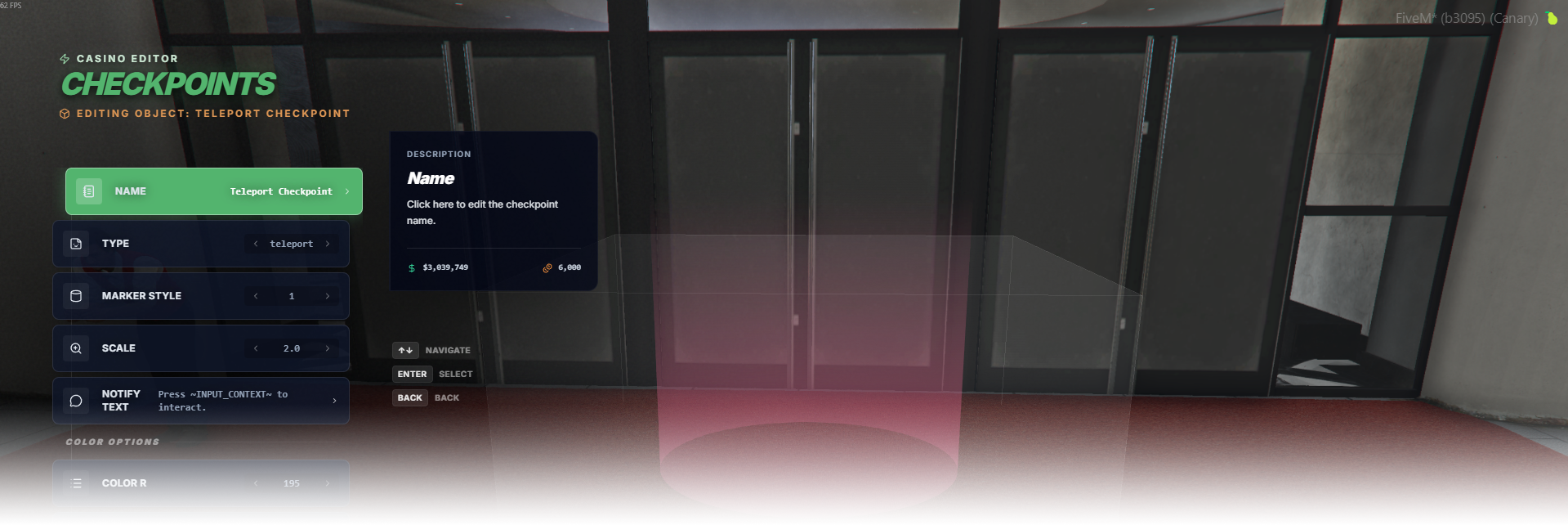
The Checkpoints editor page manages interactive marker checkpoints for event triggering, teleporting, and casino vehicle podium interactions.

<div data-full-width="false"><figure><img src="https://1037498771-files.gitbook.io/~/files/v0/b/gitbook-x-prod.appspot.com/o/spaces%2F-MZErcztD5BvrKnwRGJq%2Fuploads%2Fgit-blob-03a661901a43a96c74bc32d805f2cd23f1a4a4c7%2Fcapt_checkpoints.png?alt=media" alt=""><figcaption></figcaption></figure></div>

### Editor Settings

<table data-full-width="false"><thead><tr><th>Setting</th><th>Info</th></tr></thead><tbody><tr><td>Name</td><td>Choose a display name for the checkpoint</td></tr><tr><td>Type</td><td>Choose behavior: <code>event</code>, <code>teleport</code>, or <code>casinovehicle</code></td></tr><tr><td>Marker style</td><td>Set GTA marker type id (0..43)</td></tr><tr><td>Scale</td><td>Set marker size scale</td></tr><tr><td>Notify text</td><td>Set interaction/prompt text shown for this checkpoint</td></tr><tr><td>Marker color</td><td>Set marker color using presets or custom channels</td></tr><tr><td>Event name</td><td>Set triggered event name when type is <code>event</code></td></tr><tr><td>Teleport coords (X/Y/Z)</td><td>Teleport destination when type is <code>teleport</code></td></tr><tr><td>Use current coords</td><td>Copy current player position into teleport coordinates</td></tr><tr><td>Fade while teleport</td><td>Enable/disable screen fade during teleport flow</td></tr><tr><td>Podium</td><td>Select podium spinner id when type is <code>casinovehicle</code></td></tr><tr><td>Manage Restrictions</td><td>Open restrictions editor for access rules</td></tr><tr><td>Proximity</td><td>Set interaction/subscription distance in meters</td></tr><tr><td>Change Position</td><td>Move the checkpoint with the position gizmo</td></tr><tr><td>Change Rotation</td><td>Rotate the checkpoint with the rotation gizmo</td></tr><tr><td>Load Only Inside Interiors</td><td>Load this checkpoint only while players are in interiors</td></tr><tr><td>Add checkpoint</td><td>Create a new checkpoint near current player position</td></tr><tr><td>Delete</td><td>Delete selected checkpoint</td></tr></tbody></table>

## CheckpointTypes

<table data-full-width="false"><thead><tr><th>Type</th><th>Behavior</th><th>Settings</th></tr></thead><tbody><tr><td><code>event</code></td><td>Runs configured event when player interacts with the checkpoint.</td><td>Event Name, Notify Text, Manage Restrictions</td></tr><tr><td><code>teleport</code></td><td>Teleports player to configured destination when interacted.</td><td>Teleport X, Teleport Y, Teleport Z, Fade While Teleport, Notify Text, Manage Restrictions</td></tr><tr><td><code>casinovehicle</code></td><td>Uses linked podium spinner/vehicle context for casino vehicle interaction flow.</td><td>Podium, Notify Text, Manage Restrictions</td></tr></tbody></table>