> For the complete documentation index, see [llms.txt](https://documentation.rcore.cz/llms.txt). Markdown versions of documentation pages are available by appending `.md` to page URLs; this page is available as [Markdown](https://documentation.rcore.cz/paid-resources/rcore_casino/features/editor/casinos.md).

# Casinos

Managing Casinos in the Casino Editor

The Casinos editor page allows you to link an interior ID to a casino. Once linked, you can manage the casino’s opening hours, customize the minimap and chips HUD displayed while inside the casino, and configure other related settings.

<div data-full-width="false"><figure><img src="https://1037498771-files.gitbook.io/~/files/v0/b/gitbook-x-prod.appspot.com/o/spaces%2F-MZErcztD5BvrKnwRGJq%2Fuploads%2Fgit-blob-b756ab84029497ad6535f383c60ed7566941ee1f%2Fcapt_casinos.png?alt=media" alt=""><figcaption></figcaption></figure></div>

### Multiple casinos

Each entry here holds the rules for one or more interiors (opening hours, closed message, kick-out coords, restricted controls, minimap, chips HUD, society, enter and leave actions, default bouncer), so one server can run several casinos with different rules. To add an entry, stand inside the interior, open `/casinoeditor`, go to Casinos and click Add Casino. The entry starts with the interior you are standing in, and Append Current Interior ID adds more. If another entry already uses that interior, the editor refuses and shows its name.

### Editor Settings

<table data-full-width="false"><thead><tr><th width="260">Setting</th><th>Info</th></tr></thead><tbody><tr><td>Name</td><td>Display name of the casino.</td></tr><tr><td>Interior IDs</td><td>Interiors that belong to this casino, separated by commas.</td></tr><tr><td>Append Current Interior ID</td><td>Add the interior you are standing in.</td></tr><tr><td>Restrict controls</td><td>Blocks weapons, fighting, jumping and crouching inside the casino.</td></tr><tr><td>Enable Society</td><td>Whether the casino has a society account.</td></tr><tr><td>Society Name</td><td>Which society account it uses.</td></tr><tr><td>Show Chips HUD</td><td>Show the chips HUD while the player is inside the casino.</td></tr><tr><td>Default Bouncer</td><td>Bouncer group linked to this casino. Other scripts read it through the <code>GetCasinoBouncerId</code> export.</td></tr><tr><td>Delete</td><td>Delete the casino.</td></tr><tr><td>Add Casino</td><td>Create a new casino for the interior you are standing in. It is in the list of casinos, not inside a casino.</td></tr></tbody></table>

### Opening Hours

<table data-full-width="false"><thead><tr><th width="260">Setting</th><th>Info</th></tr></thead><tbody><tr><td>Sunday to Saturday</td><td>One row for each day. Click a day and type the hours the casino is open, separated by commas (<code>0</code>-<code>23</code>, e.g. <code>18, 19, 20</code>). Use <code>-1</code> to stay open all day, or leave it empty to stay closed that day.</td></tr><tr><td>Closed Message</td><td>Shown when a player walks into the casino outside its opening hours, or is still inside when it closes. <code>%s</code> is replaced with the next opening time. The player is then moved to Kick Out Coords.</td></tr><tr><td>Kick Out Coords</td><td>X, Y and Z of the place the player is moved to.</td></tr><tr><td>Use Current Position</td><td>Fill Kick Out Coords with your current position.</td></tr></tbody></table>

When the casino closes, players inside are moved out. Anyone in a game finishes their round first. Players in the editor can stay, and can also walk in while it's closed.

### Minimap

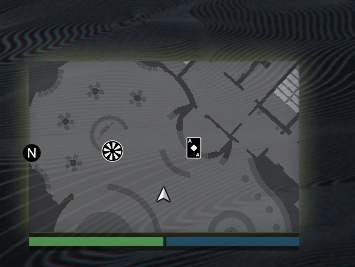
<table data-full-width="false"><thead><tr><th width="260">Setting</th><th>Info</th></tr></thead><tbody><tr><td>Show Minimap</td><td>Show the minimap while the player is inside the casino.</td></tr><tr><td>Minimap Zoom Level</td><td>Minimap zoom inside the casino. At <code>0.0</code> the game's own zoom is used.</td></tr><tr><td>Minimap Interior ID</td><td>Interior map the minimap shows, for example <code>ch_dlc_casino_back</code>. X, Y and Heading can be changed only after it is set.</td></tr><tr><td>Minimap X Position, Minimap Y Position, Minimap Heading</td><td>Line the interior map up with the casino. The Diamond Casino values are in <a href="#diamond-casino-values">Diamond Casino values</a>.</td></tr></tbody></table>

### Actions

<table data-full-width="false"><thead><tr><th width="260">Setting</th><th>Info</th></tr></thead><tbody><tr><td>Action on enter</td><td>What runs on the player's client when they enter the casino: Nothing, Call an event or Call an export.</td></tr><tr><td>Action on leave</td><td>The same, when they leave the casino.</td></tr><tr><td>Action name</td><td>The event or export to call, for example <code>my:event</code> or <code>exports.resource:fn</code>. Arguments are optional: <code>my:event(4, "hello")</code>.</td></tr></tbody></table>

## Opening hours (how to set them)

Opening hours are stored in `openHours` as a day-indexed table where:

* `[1]` = Sunday
* `[2]` = Monday
* `[3]` = Tuesday
* `[4]` = Wednesday
* `[5]` = Thursday
* `[6]` = Friday
* `[7]` = Saturday

Each day is a list of allowed hour values in 24h format (`0..23`).

* Use `{-1}` to keep that day open all day.
* Use a list like `{18, 19, 20, 21, 22, 23}` to open only in evening/night hours.

Example:

```lua
openHours = {
  [1] = {-1},                          -- Sunday: open all day
  [2] = {10, 11, 12, 13, 14, 15, 16}, -- Monday: 10:00-16:59
  [3] = {10, 11, 12, 13, 14, 15, 16},
  [4] = {10, 11, 12, 13, 14, 15, 16},
  [5] = {18, 19, 20, 21, 22, 23},     -- Thursday: evening
  [6] = {18, 19, 20, 21, 22, 23},     -- Friday: evening
  [7] = {-1}                           -- Saturday: open all day
}
```

## Radar interior id (how to set it)

`Radar interior id` is used when `Show radar` is enabled, and it defines which interior radar context should be used for minimap rendering.

How to set it in editor:

1. Open the casino profile.
2. Enable Show radar.
3. Set Radar interior id (usually the interior id/string expected by your radar setup).
4. Adjust Radar X, Radar Y, and Radar Heading until minimap alignment matches your interior.

<div data-full-width="false"><figure><img src="https://1037498771-files.gitbook.io/~/files/v0/b/gitbook-x-prod.appspot.com/o/spaces%2F-MZErcztD5BvrKnwRGJq%2Fuploads%2Fgit-blob-f18279eea6a6d55fe7d4254a5c9ec781ee7f59cf%2Fcasino_radar.png?alt=media" alt="Radar interior id example in casino editor"><figcaption><p>Radar interior id setup example</p></figcaption></figure></div>

### Diamond Casino values

<table data-header-hidden data-full-width="false"><thead><tr><th>-</th><th>-</th></tr></thead><tbody><tr><td>Minimap Interior ID</td><td><code>ch_dlc_casino_back</code></td></tr><tr><td>Minimap X Position</td><td><code>974.89</code></td></tr><tr><td>Minimap Y Position</td><td><code>22.80</code></td></tr><tr><td>Minimap Heading</td><td><code>-31.0</code></td></tr></tbody></table>