> For the complete documentation index, see [llms.txt](https://documentation.rcore.cz/llms.txt). Markdown versions of documentation pages are available by appending `.md` to page URLs; this page is available as [Markdown](https://documentation.rcore.cz/paid-resources/rcore_casino/features/editor/ambient-peds.md).

# Ambient Peds

Managing ambient peds in the Casino Editor

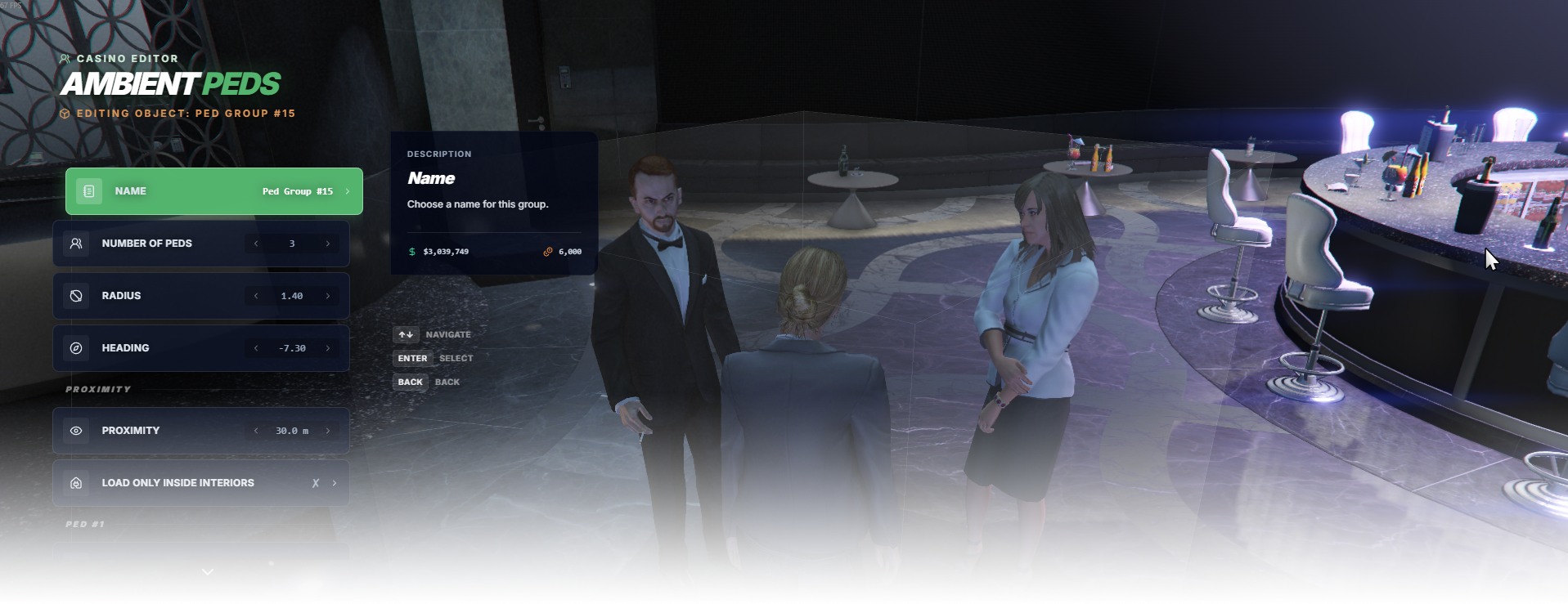
The Ambient Peds editor page manages ambient pedestrian groups used to populate the casino.

<div data-full-width="false"><figure><img src="https://1037498771-files.gitbook.io/~/files/v0/b/gitbook-x-prod.appspot.com/o/spaces%2F-MZErcztD5BvrKnwRGJq%2Fuploads%2Fgit-blob-eaef1de26ed5748b1f6a97cbecc091ffeaec534e%2Fcapt_ambientpeds.png?alt=media" alt=""><figcaption></figcaption></figure></div>

### Editor Settings

<table data-full-width="false"><thead><tr><th width="260">Setting</th><th>Info</th></tr></thead><tbody><tr><td>Name</td><td>Display name of the group.</td></tr><tr><td>Number of Peds</td><td>How many peds are in the group, 1 to 5.</td></tr><tr><td>Radius</td><td>How far the peds stand from the group's centre.</td></tr><tr><td>Heading</td><td>Which way the group faces.</td></tr><tr><td>Proximity</td><td>Distance in meters at which the group loads for players.</td></tr><tr><td>Load Only Inside Interiors</td><td>Load the group only while the player is inside an interior.</td></tr><tr><td>Ped #1-#5: Model</td><td>Which ped model that ped uses.</td></tr><tr><td>Ped #1-#5: Scenario</td><td>What that ped is doing, from <code>AmbientScenarios</code>.</td></tr><tr><td>Ped #1-#5: Variation</td><td>Outfit of that ped model.</td></tr><tr><td>Change Position / Change Rotation</td><td>Move or rotate the group with the gizmo.</td></tr><tr><td>Delete</td><td>Delete the group.</td></tr><tr><td>Add Group</td><td>Create a new ped group. It is in the list of groups, not inside a group.</td></tr></tbody></table>

## AmbientPedModels

Ambient ped models available in editor are defined in `configs/peds/ambientpeds.lua` in the `AmbientPedModels` list.

Only models from this list can be selected in the ambient ped editor for ped slots.

```lua
AmbientPedModels = {
    "a_f_m_bevhills_01",
    "a_f_m_bevhills_02",
    "a_f_m_ktown_01",
    "a_f_y_bevhills_01",
    "a_f_y_bevhills_02",
    "a_f_y_bevhills_03",
    "a_f_y_bevhills_04",
    "a_f_y_business_01",
    "a_f_y_clubcust_01",
    "a_f_y_clubcust_02",
    "a_f_y_genhot_01",
    "a_f_y_hipster_02",
    "a_f_y_hipster_03",
    "a_f_y_vinewood_02",
    "a_f_y_vinewood_03",
    "a_f_y_vinewood_04",
    "a_f_y_smartcaspat_01",
    "a_m_m_bevhills_02",
    "a_m_y_bevhills_01",
    "a_m_y_bevhills_02",
    "a_m_y_busicas_01",
    "a_m_y_business_02",
    "a_m_y_business_03",
    "a_m_y_genstreet_01",
    "a_m_y_hipster_01",
    "a_m_y_gencaspat_01",
    "a_m_y_smartcaspat_01",
    "ADD_YOUR_PED_HERE",
}
```

## AmbientScenarios

Ambient scenarios available in editor are defined in `configs/peds/ambientpeds.lua` in the `AmbientScenarios` list.

These are used by the editor's scenario selectors for each ped slot.

```lua
AmbientScenarios = {
    "PROP_HUMAN_SEAT_BENCH_DRINK_BEER",
    "PROP_HUMAN_SEAT_CHAIR_UPRIGHT",
    "PROP_HUMAN_SEAT_CHAIR_FOOD",
    "PROP_HUMAN_SEAT_DECKCHAIR_DRINK",
    "PROP_HUMAN_SEAT_CHAIR",
    "WORLD_HUMAN_PARTYING",
    "WORLD_HUMAN_MOBILE_FILM_SHOCKING",
    "WORLD_HUMAN_STAND_IMPATIENT",
    "WORLD_HUMAN_WINDOW_SHOP_BROWSE",
    "WORLD_HUMAN_SMOKING",
    "WORLD_HUMAN_STAND_MOBILE",
    "WORLD_HUMAN_HANG_OUT_STREET",
    "WORLD_HUMAN_GUARD_STAND_CASINO",
    "WORLD_HUMAN_LEANING_CASINO_TERRACE",
    "ADD_YOUR_SCENARIO_HERE",
}
```

## AmbientAnimations

Ambient animation definitions are in `configs/peds/ambientpeds.lua` in the `AmbientAnimations` table.

Each animation entry defines animation dictionary + animation name

```lua
AmbientAnimations = {
    {
        name = "base",
        dict = "amb@world_human_cheering@female_c",
    },
    {
        name = "base",
        dict = "anim@amb@office@boardroom@boss@female@",
    },
    {
        name = "simple_inspect_v1_idartistfemale",
        dict = "anim@amb@business@cfid@cfid_desk_docs@",
    },
    {
        name = "ADD_YOUR_ANIM_NAME_HERE",
        dict = "ADD_YOUR_ANIM_DICT_HERE",
    },
}

```